Imagine you open your Annual Information Statement (AIS) before filing your Income Tax Return and suddenly see ₹8 lakh of interest income.
But your actual bank interest is only ₹2.5 lakh.
Or perhaps you find a property transaction that does not belong entirely to you. Maybe a mutual fund transaction is appearing twice. Or a bank has reported a transaction against your PAN that actually belongs to another person.
Naturally, the first question is:
“Will the Income Tax Department treat this amount as my income?”
The answer is not as simple as “yes” or “no.”
AIS is an important information statement used by the Income Tax Department to provide taxpayers with financial and tax-related information available with the department. It also provides a mechanism through which taxpayers can submit feedback on reported information. The department itself clarifies that AIS contains information presently available with it and that taxpayers must still report complete and accurate information in their ITR.
Therefore, an incorrect entry in AIS does not automatically mean that you have taxable income of that amount.
However, you should not simply ignore the mismatch either.
Instead, you should investigate the entry, verify your documents, submit appropriate AIS feedback wherever necessary, communicate with the reporting entity if required, and finally file the ITR based on your actual taxable income and correct tax position.
This guide explains the complete practical process.
👉 AIS Showing Wrong Income? Get Expert HelpTable of Contents
- What Is AIS?
- AIS vs Form 26AS vs TIS — What Is the Difference?
- Does Wrong Income in AIS Mean You Have to Pay Tax on It?
- Why Does AIS Show Wrong Income?
- Step-by-Step: How to Correct Wrong Information in AIS
- What Feedback Options Are Available in AIS?
- What Happens After You Submit AIS Feedback?
- Should You Contact the Bank, Employer, Broker or Mutual Fund House?
- What If AIS Is Wrong but You Have to File Your ITR Now?
- A Professional AIS Reconciliation Process
- What Documents Should You Keep for AIS Mismatch?
- Common AIS Mistakes Taxpayers Should Avoid
- What If the AIS and ITR Figures Are Different?
- What About TIS If AIS Is Corrected?
- What If the Wrong AIS Entry Is Still Showing?
- Important Update for AY 2026-27: Old Act vs New Income-tax Act
- Is AIS Available for Foreign Asset Information?
- Does AIS Contain Everything the Income Tax Department Knows About You?
- Should You Correct AIS Before Filing ITR?
- AIS Correction Checklist Before Filing ITR
- Final Takeaway
- Frequently Asked Questions About AIS Correction
- Author's Note
What Is AIS?
AIS stands for Annual Information Statement.
It is essentially a comprehensive information statement made available to taxpayers through the Income Tax Department’s e-filing system.
The purpose of AIS is to give taxpayers visibility of information available with the department before they file their return. It also provides an online feedback mechanism and supports the pre-filling of tax returns.
AIS can contain information relating to:
- TDS and TCS
- Salary-related information
- Interest income
- Dividend income
- Securities transactions
- Mutual fund transactions
- Property transactions
- Specified Financial Transactions (SFT)
- Tax payments
- Refund-related information
- Foreign remittances
- GST-related information in applicable cases
- Certain foreign asset information
- Other information received from reporting entities
The Income Tax Department’s current AIS material also states that information such as foreign remittances, GST returns, dividend and mutual fund information, foreign asset information and other reported financial information can appear in AIS.
So, AIS is much broader than Form 26AS.
AIS vs Form 26AS vs TIS — What Is the Difference?
This is where many taxpayers become confused.
AIS
Form 26AS
AIS contains a broader range of reported financial and tax information.
From AY 2023-24 onwards, Form 26AS primarily contains TDS/TCS-related information, while other information is available through AIS.
TIS
TIS means Taxpayer Information Summary.
TIS aggregates information category-wise, such as salary, interest, dividend and other categories.
Importantly, the Income Tax Department states that the value accepted by the taxpayer or confirmed by the source in TIS may be used for pre-filling the return, wherever applicable.
That is why you should not look only at AIS.
You should ideally review:
AIS → TIS → Form 26AS → Bank statements → Broker/Mutual Fund statements → Form 16 → Books of account → Other supporting documents
This reconciliation is particularly important where the amounts are substantial.
Does Wrong Income in AIS Mean You Have to Pay Tax on It?
No.
This is one of the most important points taxpayers should understand.
AIS is an information statement. It is not, by itself, a final determination of your taxable income.
For example, suppose your AIS shows:
Mutual fund redemption: ₹10,00,000
That does not necessarily mean your taxable capital gain is ₹10,00,000.
The ₹10 lakh may represent the gross redemption or sale value, while your actual taxable capital gain may be significantly lower after considering the relevant cost and applicable provisions.
Similarly, suppose AIS shows:
Bank transaction: ₹15,00,000
That does not automatically mean ₹15 lakh is taxable income.
It could represent:
- transfer between your own bank accounts,
- repayment of a loan,
- sale proceeds,
- capital receipt,
- business receipts,
- a transaction belonging partly to another person,
- or another non-taxable/non-income transaction.
Therefore, never calculate your taxable income merely by adding all amounts appearing in AIS.
Instead, determine the nature of each transaction.
The Income Tax Department itself specifically states that AIS may not contain every transaction of a taxpayer and that the taxpayer is expected to check all relevant information and report complete and accurate information in the ITR.
Why Does AIS Show Wrong Income?
There are several practical reasons.
1. Reporting Entity Made a Mistake
Banks, employers, mutual fund houses, registrars, brokers and other reporting entities provide information to the Income Tax Department.
If the reporting entity submits incorrect information, the same information may appear in AIS.
For example:
A bank reports FD interest of ₹5 lakh instead of ₹50,000.
Your AIS may consequently show ₹5 lakh.
2. Duplicate Reporting
Sometimes the same transaction can appear more than once.
For example, an income or transaction may be reported through more than one reporting channel or may appear duplicated because of reporting or data-processing issues.
In such cases, adding both entries together can artificially inflate your income.
3. Wrong PAN Mapping
A transaction belonging to another person can sometimes be reported against your PAN.
For example:
A bank account or investment transaction may have been incorrectly linked with your PAN.
This is a serious issue because the transaction may appear as if it belongs to you.
4. Joint Transactions
Joint ownership is another common reason for confusion.
For example, a property worth ₹1 crore may appear under one person’s PAN even though multiple people have ownership rights.
The taxpayer should examine the actual ownership and transaction documents rather than automatically treating the entire amount as personal taxable income.
5. Wrong Financial Year
A transaction may be reported in an incorrect year.
For instance, a receipt may actually relate to one financial year but appear under another year’s information.
In such a case, the taxpayer should use the appropriate AIS feedback mechanism.
6. Gross Amount Is Reported Instead of Taxable Amount
This is extremely important for investors.
AIS may show a transaction value, but the amount shown does not necessarily represent taxable income.
Examples can include:
- securities sale value,
- mutual fund redemption value,
- property transaction value,
- business receipts,
- loan transactions,
- bank credits.
Therefore, the taxpayer must distinguish between transaction value and taxable income.
How to Check Your AIS Before Filing ITR
The Income Tax Department currently provides access to AIS through the e-filing portal.
The official process is:
- Log in to the Income Tax e-filing portal.
- Open the Annual Information Statement (AIS) option.
- Proceed to the AIS portal.
- Select the relevant financial year.
- Open AIS.
- Review the information category-wise.
The department also provides an alternative route through:
e-File → Income Tax Return → View AIS
The official AIS FAQ confirms both access routes.
For AY 2026-27, the relevant income period is FY 2025-26.
Step-by-Step: How to Correct Wrong Information in AIS
Now comes the most important part.
Suppose you have identified an incorrect transaction.
What should you do?
Step 1: Open the Relevant AIS Entry
Open the relevant information category and locate the transaction.
Do not immediately submit feedback.
First, understand:
- reporting entity,
- transaction date,
- information code,
- reported amount,
- account/reference details,
- financial year,
- transaction description.
Step 2: Compare It With Your Documents
Before submitting feedback, check the underlying documents.
For example:
If it is bank interest
Check:
- bank interest certificate,
- bank statement,
- FD statement,
- savings account statement.
If it is salary
Check:
- Form 16,
- salary slips,
- employer records.
If it is securities
Check:
- broker contract notes,
- capital gain statement,
- transaction statement,
- demat statement.
If it is mutual funds
Check:
- mutual fund statement,
- registrar statement,
- capital gains statement.
If it is property
Check:
- sale deed,
- purchase deed,
- ownership documents,
- consideration details,
- applicable registration documents.
This step is crucial.
Do not submit AIS feedback merely because the amount “looks high.”
You should know exactly why it is wrong.
Step 3: Select “Feedback”
The current AIS functionality allows taxpayers to submit feedback against active information.
According to the Income Tax Department, you can select the relevant information, use the feedback option, choose the appropriate feedback category, enter the required details and submit the response.
What Feedback Options Are Available in AIS?
The exact options can vary depending on the information category. However, the AIS system has historically provided options such as:
1. Information is Correct
Use this when the transaction belongs to you and the information is correct.
If everything is correct, there is normally no reason to submit a correction.
2. Information Is Not Fully Correct
This is one of the most useful options.
Use it where:
- the transaction belongs to you,
- but the amount or other information is incorrect.
For example:
AIS shows bank interest:
₹3,00,000
Actual interest:
₹2,40,000
If the entry belongs to you but the reported information is wrong, this is the type of situation where the “Information is not fully correct” feedback may be relevant.
The AIS guidance provides for correction of relevant information fields through this feedback mechanism.
3. Information Relates to Other PAN/Year
This option is relevant where the transaction relates to another person or another financial year.
For example:
- transaction belongs to your spouse,
- transaction belongs to another family member,
- property is jointly owned,
- transaction relates to a different year,
- transaction has been incorrectly reported against your PAN.
The AIS user guide specifically recognises this feedback category.
Be careful here.
Do not select “Other PAN/Year” simply because the transaction is not taxable.
If the transaction belongs to you but is not taxable, the appropriate category may be different depending on the transaction and the options displayed.
4. Information Is Duplicate / Included in Other Information
Suppose the same transaction appears twice.
For example:
Entry A: ₹2,00,000
Entry B: ₹2,00,000
If both represent the same underlying transaction, you should investigate the duplication before reporting the income twice.
The AIS feedback framework specifically recognises duplicate/included information as a feedback category.
5. Information Is Denied
This is relevant where you do not recognise or accept the reported transaction as belonging to you.
For example:
AIS shows an investment that you never made.
In such a situation, you should first investigate whether:
- your PAN was incorrectly quoted,
- the reporting entity made an error,
- there was identity/PAN misuse,
- the transaction actually belongs to another person.
If the transaction is genuinely unknown, the matter should be taken seriously rather than simply ignored.
6. Category-Specific / Customised Feedback
Certain AIS information categories may provide additional feedback choices.
The AIS user guide specifically states that customised feedback options may be available depending on the information category.
Therefore, do not assume that every AIS transaction will show exactly the same feedback menu.
What Happens After You Submit AIS Feedback?
After you submit feedback successfully, the AIS can display:
- the reported value,
- the modified value,
- your feedback,
- activity history.
The Income Tax Department states that an acknowledgement receipt can be downloaded and that email/SMS confirmations are sent after successful submission.
This is important because you should retain evidence of the correction.
Therefore, after submitting feedback:
Download the acknowledgement.
Also keep:
- AIS copy,
- feedback acknowledgement,
- supporting documents,
- correspondence with bank/broker/employer,
- corrected statements, if received.
Can AIS Feedback Be Modified Later?
Yes.
The current Income Tax Department FAQ states that there is currently no limit on the number of times previously submitted AIS feedback can be modified.
That gives taxpayers some flexibility.
However, this does not mean that you should randomly change feedback.
Every feedback submission should be based on documentary evidence.
Will AIS Immediately Become Correct After Feedback?
Not necessarily.
This is an important practical point.
AIS feedback is a mechanism for communicating that the reported information needs reconsideration. The AIS can show a modified value after feedback, while source confirmation or further processing can also affect the information. The Income Tax Department expressly distinguishes between reported information and the value after taxpayer feedback/source confirmation.
Therefore, do not assume that submitting feedback is equivalent to instantly changing the original reporting entity’s records.
For significant discrepancies, you should also contact the reporting entity.
Should You Contact the Bank, Employer, Broker or Mutual Fund House?
Yes, where the error originates with them.
This is often the most practical solution.
For example:
Bank reported wrong interest
Contact the bank and request correction of the relevant tax reporting.
Employer reported wrong salary/TDS
Contact the employer and request correction of the relevant TDS statement/Form 16 information.
Mutual fund reported incorrect transaction
Contact the mutual fund/registrar and request correction.
Broker reported incorrect securities information
Contact the broker and obtain the corrected transaction/capital gain statement.
Property transaction incorrectly reported
Review the reporting source and supporting documents and, where appropriate, seek correction from the relevant reporting entity.
In other words:
AIS feedback is one part of the correction process; source-level correction may also be necessary.
What If AIS Is Wrong but You Have to File Your ITR Now?
This is perhaps the most practical question.
Suppose:
AIS shows income: ₹10 lakh
Your actual taxable income: ₹6 lakh
You have submitted AIS feedback, but the AIS has not yet fully changed.
Should you wait?
Generally, you should not manufacture your taxable income merely to match an incorrect AIS.
The Income Tax Department itself states that AIS contains information presently available with the department and that taxpayers are expected to report complete and accurate information in their ITR.
Therefore, your ITR should be prepared based on:
- actual income,
- applicable tax provisions,
- books and records,
- bank statements,
- capital gain statements,
- Form 16,
- TDS certificates,
- other supporting documents.
At the same time, you should retain evidence explaining the AIS mismatch.
This is especially important if the mismatch is material.
Example: AIS Shows ₹10 Lakh but Actual Income Is ₹2 Lakh
Let’s understand this practically.
Suppose your AIS shows:
Bank transaction: ₹10,00,000
But you know that this ₹10 lakh is actually a transfer from your savings account to your current account.
It is not additional income.
You should not simply report ₹10 lakh as taxable income because it appears in AIS.
Instead:
- Verify the bank statements.
- Identify the source and destination accounts.
- Establish that both accounts belong to you.
- Submit AIS feedback if appropriate.
- Keep the bank statements.
- Report only the income that is actually taxable.
This is why AIS reconciliation is more important than simply copying AIS numbers into the ITR.
Example: AIS Shows ₹5 Lakh Interest but Actual Interest Is ₹2 Lakh
Suppose AIS shows:
Interest income = ₹5,00,000
But your bank’s interest certificate shows:
₹2,00,000
First, determine why the difference exists.
Perhaps:
- one FD was wrongly reported,
- another person’s FD was mapped to your PAN,
- duplicate reporting occurred,
- the reporting period is incorrect,
- or the bank’s data itself is wrong.
After identifying the issue, submit the appropriate AIS feedback and contact the bank if necessary.
Then report the correct taxable interest in your ITR based on your actual records.
Example: AIS Shows Mutual Fund Redemption of ₹20 Lakh
This is another very common misunderstanding.
Suppose your AIS shows:
Mutual fund redemption = ₹20 lakh
That does not mean:
Taxable income = ₹20 lakh
You need to calculate the applicable capital gain based on the actual transaction details and the tax provisions applicable to the relevant period.
Therefore, the taxpayer should obtain a proper capital gains statement and reconcile the transaction with AIS.
This distinction between transaction amount and taxable income is fundamental.
Example: Property Transaction Appears in AIS
Suppose AIS shows:
Property transaction = ₹1 crore
You may own the property jointly with another person.
Or perhaps the AIS amount represents the transaction value rather than your taxable gain.
Therefore, you should examine:
- ownership percentage,
- purchase consideration,
- sale consideration,
- date of transfer,
- cost,
- applicable exemptions,
- capital gain computation,
- reporting source.
Do not simply put ₹1 crore into the income section of the ITR.
A Professional AIS Reconciliation Process
If you are serious about avoiding tax notices and mismatches, use a structured process.
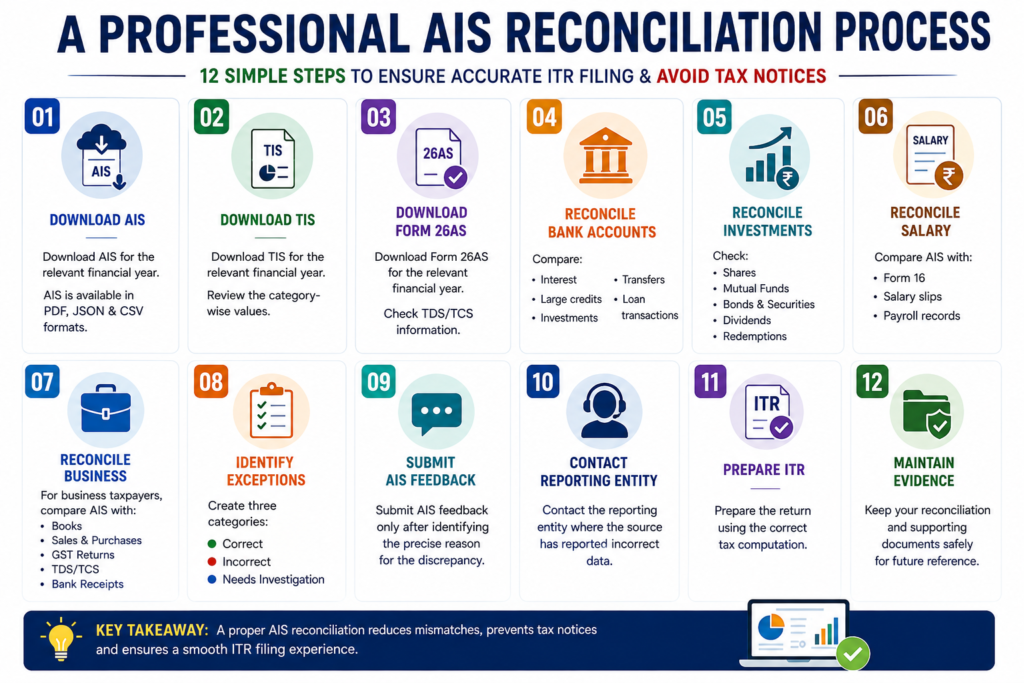
Step 1 — Download AIS
Download AIS for the relevant financial year.
The department provides AIS downloads in PDF, JSON and CSV formats.
Step 2 — Download TIS
Review the category-wise values.
Step 3 — Download Form 26AS
Check TDS/TCS information.
Step 4 — Reconcile Bank Accounts
Compare:
- interest,
- large credits,
- investments,
- transfers,
- loan transactions.
Step 5 — Reconcile Investments
Check:
- shares,
- mutual funds,
- bonds,
- securities,
- dividends,
- redemptions.
Step 6 — Reconcile Salary
Compare AIS with:
- Form 16,
- salary slips,
- payroll records.
Step 7 — Reconcile Business
For business taxpayers, compare AIS with:
- books,
- sales,
- purchase records,
- GST returns,
- TDS/TCS,
- bank receipts.
Step 8 — Identify Exceptions
Create three categories:
Correct
Incorrect
Needs Investigation
Step 9 — Submit AIS Feedback
Only after identifying the precise reason for the discrepancy.
Step 10 — Contact Reporting Entity
Where the source has reported incorrect data.
Step 11 — Prepare ITR
Prepare the return using the correct tax computation.
Step 12 — Maintain Evidence
Keep your reconciliation and supporting documents.
What Documents Should You Keep for AIS Mismatch?
If an AIS mismatch exists, maintain a proper evidence file.
Depending on the case, this can include:
- AIS PDF
- TIS
- Form 26AS
- Bank statements
- Form 16
- Salary slips
- Interest certificates
- Capital gain statements
- Demat statements
- Broker statements
- Mutual fund statements
- Property documents
- Loan statements
- GST returns
- Books of account
- Ledger accounts
- TDS certificates
- AIS feedback acknowledgement
- Emails sent to reporting entities
- Corrected statements received from reporting entities
This becomes extremely useful if the department later asks you to explain the difference.
Common AIS Mistakes Taxpayers Should Avoid
Mistake 1: Treating Every AIS Amount as Taxable Income
This is wrong.
AIS is an information database, not a direct taxable-income statement.
Mistake 2: Ignoring AIS Completely
The opposite approach is also dangerous.
AIS should be reviewed carefully before filing.
Mistake 3: Filing ITR Solely Based on AIS
AIS may contain errors and may not contain every transaction.
The department itself says taxpayers must check all relevant information and report complete and accurate information.
Mistake 4: Assuming AIS Correction Is Instant
Feedback does not necessarily mean the underlying source’s records have instantly been corrected.
Mistake 5: Not Contacting the Reporting Entity
If the bank, employer, broker or another reporting entity made the mistake, source-level correction may be important.
Mistake 6: Selecting the Wrong Feedback Category
For example, do not mark a transaction as “other PAN” merely because you believe it is not taxable.
First determine why the transaction is incorrect.
Mistake 7: Not Keeping Evidence
Always save your feedback acknowledgement and supporting documents.
What If the AIS and ITR Figures Are Different?
An AIS-ITR difference is not automatically proof of concealment.
There can be legitimate reasons for differences.
For example:
AIS transaction value ≠ taxable income
or
AIS gross amount ≠ net taxable amount
or
AIS reported amount ≠ taxpayer’s actual amount
or
AIS amount belongs to another person
or
AIS contains duplicate information
Therefore, the important question is not simply:
“Why does AIS differ from my ITR?”
The better question is:
“Can I explain and document why AIS differs from my correctly computed ITR?”
That is the professional approach.
What About TIS If AIS Is Corrected?
This is another important point.
TIS is designed to aggregate information category-wise.
The current AIS FAQ states that the value accepted by the taxpayer or confirmed by the source can be reflected in TIS and may be used for pre-filling the return, where applicable.
Therefore, after submitting feedback, you should review both:
AIS and TIS
Do not assume that correcting an individual AIS transaction means every related pre-filled figure has immediately changed everywhere.
What If the Wrong AIS Entry Is Still Showing?
If you have submitted feedback but the information remains unresolved, take a practical approach.
First
Download and preserve the feedback acknowledgement.
Second
Contact the reporting entity.
Third
Obtain corrected documentation wherever possible.
Fourth
Maintain a reconciliation showing:
AIS amount
minus/plus
Correction
equals
Actual amount
Fifth
Prepare the ITR based on the correct tax position.
If the issue involves a significant amount or a complex transaction, professional tax advice may be appropriate.
The Income Tax Department also provides a dedicated AIS and Reporting Portal contact channel for AIS/TIS-related queries.
Important Update for AY 2026-27: Old Act vs New Income-tax Act
There is an important transition point taxpayers should understand in 2026.
The Income-tax Act, 2025 has come into operation for income relating to Tax Year 2026-27 onwards, i.e. income earned from 1 April 2026.
However, AY 2026-27 relates to FY 2025-26.
Therefore, the return for AY 2026-27 continues to be governed by the Income-tax Act, 1961. The Income Tax Department has specifically clarified that even revised returns for AY 2026-27 continue to be governed by the old Act.
This distinction matters.
In simple terms:
FY 2025-26 → AY 2026-27 → Income-tax Act, 1961
FY/Tax Year 2026-27 → Tax Year 2026-27 → Income-tax Act, 2025
Therefore, when discussing AIS and ITR filing for FY 2025-26/AY 2026-27, the old Act framework remains relevant.
Is AIS Available for Foreign Asset Information?
Yes.
This is particularly important for taxpayers having foreign financial interests.
In July 2026, the Income Tax Department announced that taxpayers could view foreign asset information through AIS, including information relating to CRS/FATCA reporting.
Therefore, taxpayers with overseas:
- bank accounts,
- investments,
- financial assets,
- other reportable foreign interests,
should pay particular attention to AIS and the relevant ITR disclosure requirements.
However, the presence of foreign asset information in AIS should not be interpreted mechanically as taxable income. The underlying nature of the asset, income and applicable disclosure provisions must be examined separately.
Does AIS Contain Everything the Income Tax Department Knows About You?
No.
This is a very important misconception.
The department specifically states that AIS contains information presently available with the Income Tax Department and that there may be other transactions relating to the taxpayer that are not displayed in AIS.
Therefore:
AIS is not a substitute for your books, bank statements or tax records.
You cannot say:
“This transaction is not in AIS, so I don’t have to report it.”
That approach can be risky.
The correct principle is:
Report income and transactions based on their actual taxability and disclosure requirements, not merely based on whether they appear in AIS.
Should You Correct AIS Before Filing ITR?
Ideally, yes, whenever there is an identifiable error.
However, do not confuse “correct AIS” with “correct ITR.”
They are related but separate exercises.
Your objective should be:
1. Identify the mismatch
2. Understand the reason
3. Submit appropriate AIS feedback
4. Seek correction from the reporting entity where required
5. Prepare the ITR based on actual taxable income
6. Keep documentary evidence for the difference
This approach is much safer than blindly matching the ITR to AIS.
AIS Correction Checklist Before Filing ITR
Use this checklist every year.
- Download AIS for the relevant financial year.
- Download TIS.
- Download Form 26AS.
- Reconcile salary with Form 16.
- Reconcile bank interest with bank certificates/statements.
- Reconcile dividend income.
- Reconcile shares and securities transactions.
- Reconcile mutual fund transactions.
- Reconcile capital gains.
- Check property transactions.
- Check foreign remittances.
- Check foreign asset information, where applicable.
- Check GST-related information for business taxpayers.
- Identify duplicate transactions.
- Identify transactions belonging to another PAN/person.
- Identify wrong amounts.
- Identify transactions reported in the wrong year.
- Submit appropriate AIS feedback.
- Contact the reporting entity where necessary.
- Download and preserve AIS feedback acknowledgement.
- Recheck TIS after feedback/processing.
- Prepare ITR based on actual taxable income.
- Maintain reconciliation working papers.
- File and verify the ITR within the applicable deadline.
Final Takeaway
If your AIS is showing wrong income, don’t panic—and don’t ignore it.
AIS is an important tax-information tool, but it is not a substitute for your actual tax computation.
The right approach is simple:
Check → Reconcile → Identify the error → Submit AIS feedback → Contact the reporting source if required → Document the difference → File the correct ITR.
Most importantly, remember that an amount appearing in AIS is not automatically equivalent to taxable income.
A ₹10 lakh transaction could be a ₹10 lakh sale value, a transfer, a capital receipt, a joint transaction, a duplicate entry or another transaction whose tax treatment is completely different.
Therefore, the real objective is not to make your ITR mechanically match AIS.
The objective is to make your ITR accurate, complete, explainable and supported by proper records.
For AY 2026-27, taxpayers are still dealing with the FY 2025-26/Income-tax Act, 1961 framework, even though the new Income-tax Act, 2025 applies to Tax Year 2026-27 onwards.
And because the Income Tax Department continues to expand the information available through AIS—including newer information such as foreign asset information—regular AIS reconciliation is becoming increasingly important for every taxpayer, investor, professional and business owner.
In short: Don’t file your ITR blindly from AIS. Don’t ignore AIS either. Reconcile it properly and file according to the actual tax position.
Frequently Asked Questions About AIS Correction
1. What should I do if AIS shows income that I never earned?
First verify the transaction and identify the reporting source. If the transaction genuinely does not belong to you, submit the appropriate AIS feedback, such as the relevant “other PAN” or denial category where applicable, and contact the reporting entity if necessary.
2. Can I file ITR if AIS is still incorrect?
Yes, an incorrect AIS entry does not mean you should report an incorrect amount in your ITR. The Income Tax Department expects taxpayers to report complete and accurate information. Keep proper documentation explaining the mismatch.
3. Does AIS show taxable income?
Not necessarily. AIS can contain transaction values and other reported information. You must determine the actual taxable amount under the applicable tax provisions.
4. What is TIS?
TIS stands for Taxpayer Information Summary. It presents category-wise aggregated information and can incorporate taxpayer feedback/source confirmation for purposes including pre-filling, where applicable.
5. Can I submit AIS feedback more than once?
The current Income Tax Department FAQ states that there is currently no limit on the number of times previously submitted feedback can be modified.
6. Will I receive proof after submitting AIS feedback?
Yes. The Income Tax Department states that an acknowledgement receipt can be downloaded and email/SMS confirmation is provided after successful submission.
7. Can I download AIS?
Yes. AIS can currently be downloaded in PDF, JSON and CSV formats.
8. Is Form 26AS enough for ITR reconciliation?
No. From AY 2023-24 onwards, Form 26AS primarily contains TDS/TCS information, while broader transaction information is available through AIS.
9. What if the same transaction appears twice in AIS?
Verify whether the entries genuinely represent the same transaction. If they are duplicates, use the appropriate duplicate/included-information feedback option.
10. Should I contact the bank if bank interest is wrong in AIS?
Yes. If the bank is the source of the incorrect reporting, contacting the bank and requesting correction can be important in addition to submitting AIS feedback.
Author’s Note
AIS should be treated as a reconciliation tool—not as your final income computation.
Before filing your ITR, always reconcile AIS with your actual financial records. Where there is a mismatch, identify the reason first and then select the appropriate feedback mechanism.
Tax laws and portal functionality can change, so taxpayers should verify the latest Income Tax Department instructions applicable to the relevant assessment year before filing.
Official reference: Income Tax Department — AIS FAQs